v1.0 · free forever · no account

Practical Basketball Macro
Fires perfect greens.

One hotkey fires your shot at the exact moment the green window hits. No timing guesswork, no missed releases—just consistent perfect shots every time you press the key. Works with the actual game input, so you're not risking anything.

No game modificationsNo account riskCompletely freev1.0
Perfect shot timingSingle hotkey triggerRepeatable resultsWindows desktopNo game integration
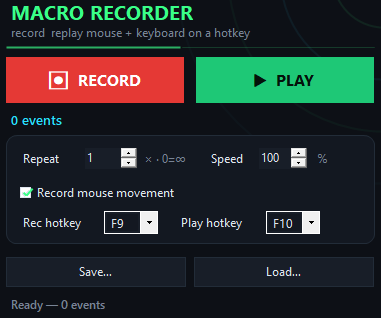
Practical Basketball Macro app window on Windows
Timing is everything

Why timing matters more than anything else.

In basketball games, the shot meter is everything—miss the window by one frame and you lose points.

Perfect greens in action
Inside the appPractical Basketball Macro window

Watch how it handles the green window.

The macro waits for the green zone and fires the shot at the optimal frame. You see the same green result over and over—no variation, no timing anxiety. This is what consistent perfection looks like in game.

Instant green releaseThe hotkey fires your shot the moment the green appears, catching it at maximum boost.
Zero missed windowsMacro timing never drifts or hesitates—every shot lands in the sweet spot.
Same result every timeYou press once, you get green. You press again, you get green. Complete predictability.
Built for Windows

What you are downloading.

Version1.0
PlatformWindows 10 and 11, 64-bit
InstallQuick download, no account
LicenseMIT, source on GitHub
PriceFree, no account
LanguageEnglish
Ready in minutes

Set up your shot hotkey in four steps.

Getting the macro running takes less time than a single game.

You asked about it

Common questions about the macro.

Will the game detect the macro?

Practical Basketball Macro sends standard keyboard input just like your hands would. It doesn't modify the game or inject code. Whether it triggers any detection depends on the game's own rules—you should check those yourself before using it.

Can I change the hotkey?

Yes. Open the app settings and assign any key you want. You can switch it anytime without reinstalling.

Does it work on Windows only?

Yes, Practical Basketball Macro is built for Windows PCs. Mac and Linux versions are not available.

What if I want a different release timing?

The macro is optimized for the green window itself. If you need to adjust when it fires, check the app settings for timing options.

Can I use it in online multiplayer?

The macro works in any game window on your PC. The game's own rules determine what's allowed—you decide if it fits within your game's guidelines.

How much does it cost?

Practical Basketball Macro is completely free. Download it, use it, no subscriptions or hidden fees.

What if the hotkey doesn't work?

Make sure the game window is active and focused. The macro only listens when the game is in the foreground. Try reassigning your hotkey in the settings if it still doesn't respond.
Stop missing shots and start making greens.

Download Practical Basketball Macro now and fire perfect shots on every release.

Download for Windows
Latest release · v1.0

Practical Basketball Macro guides